ACE: Easy Bookmark Searching in Chrome
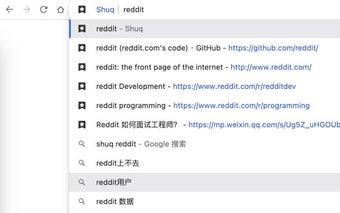
With ACE, users can easily find their bookmarks by simply typing "ace" followed by a space and their desired search term in the omnibox. This streamlined approach eliminates the need to navigate through menus or open a separate bookmark manager. ACE's integration with the omnibox allows for quick and convenient access to bookmarks, saving users valuable time.
Top Recommended Alternative

Searching for bookmarks with ACE is intuitive and hassle-free. By entering "ace" followed by a space, users can instantly search their bookmarked pages and websites. This feature is particularly useful for those with extensive bookmark collections or for individuals who frequently access specific websites.
ACE provides a seamless browsing experience for Chrome users by offering a straightforward method to search bookmarks directly from the omnibox. Its simplicity and efficiency make it a valuable tool for anyone looking to enhance their bookmarking capabilities in Chrome.